

Buying or investing in a real estate property is a big decision, especially in cities like Bangalore. Ensuring that the property has rightful ownership is essential to avoid legal issues, financial losses or fundamental transactions.
Digital platforms have made it easier and more convenient to confirm property ownership, enabling investors and potential buyers to make well-informed choices. This is what we are going to share in this blog.
Here you will get to know how to check property ownership online along with its benefits and other details.
So, let’s start
Benefits of checking ownership online
There are certain benefits that you will experience while knowing the property ownership online.
-
Fast and convenient
You can easily get property information online immediately without having to go to government buildings.
-
Transparency
With online ownership access, the possibility of false information is decreased by direct access to government documents. -
Security
Compared to physical documents, digital records are less vulnerable to manipulation. -
Cost effective
Checking property ownership online is cost-effective as it reduces the need for middlemen, which saves money.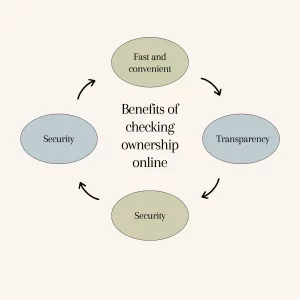
How to Check Property Ownership Online?
To make it easier to access property records, the Karnataka government has launched a number of online portals:
Bhoomi Portal
The Karnataka State Government is digitizing land records using the Bhoomi platform. It makes the Record of Rights, Tenancy, and Crops (RTC), also referred to as Pahani, accessible. Important elements of land ownership, tenancy, and agriculture are included in this document.
How to Use the Bhoomi Portal to Access RTC:
- Go to the Bhoomi RTC website.
- Proceed to the ‘View RTC and MR’ area.
- Enter information like the survey number, village, district, taluk, and hobli.
- To view the RTC, provide the data.
The ownership, land type, area, and other pertinent characteristics are detailed in this document.
Kaveri online services
The Kaveri portal, which is run by the Department of Stamps and Registration, provides services for property documentation and registration.
Services Provided
- Encumbrance Certificates (EC) Access
- Services for property registration
How to use the Kaveri portal to view property details:
Go to the portal for Kaveri Online Services.
- Create an account or sign in.
- Proceed to the ‘Online EC’ area.
- Enter the necessary property information, including the survey number, property type, district, and sub-registrar office.
- To view or download the Encumbrance Certificate, submit the necessary information.
In order to confirm title and any outstanding debts, the EC offers a record of all registered transactions pertaining to the property.
BBMP Property Tax Portal
Property owners can obtain tax-related information via the Bruhat Bengaluru Mahanagara Palike (BBMP) site at services.india.gov.in.
Services Provided
- View the specifics of property taxes
- Verify the status of the payment.
- Download the receipts
Steps to check property details
- Check out the BBMP Property Tax website.
- Enter your PID (Property Identification Number) or SAS (Self-Assessment Scheme) application number.
To obtain property tax details, such as the owner’s name and payment history, provide the information.
Also Read: What Is an Encumbrance Certificate (EC) & Why It’s Important
How to find owner details
- Using Survey Number
- A piece of land is uniquely identified by its survey number.
- BankBazaar.com
- Go to the Bhoomi website.
- Input the survey number, village, taluk, hobli, and district.
- To view ownership details, view the RTC.
- Using Property Address
- If you know the address of the property:
- Make use of the BBMP Property Tax website.
- To view tax records, which contain the owner’s name, enter the property address or PID.
- Using Khata Number
- The BBMP assigns a property’s Khata number, which is an account number.
- Go to the BBMP website.
- To view property details, including ownership details, enter the Khata number.
Bangalore property registration process
Depending on the buyer’s convenience and inclination, property registration in Bangalore can be completed online or offline.
Online registration
The Karnataka government offers access to the Kaveri Online Services portal for online registration.
Prior to using the portal, you must register or sign in to their account.
Compile and upload the necessary paperwork, such as sale deeds, identity documents, and property details, after logging in. The subsequent phase entails figuring out the relevant registration costs and stamp duty, which can also be completed using the portal.
You must make an appointment with the appropriate sub-registrar office for final submission and physical document verification after finishing the payment process.
Offline registration
The procedure entails going to the sub-registrar office, which is in charge of the property. You must provide hard copies of the required paperwork, turn them in at the office, pay the required fees, and, with the sub-registrar’s assistance, finish the procedures in person.
Although both approaches are legitimate, online registration is more convenient and saves time, particularly for tech-savvy people.
Also Read: What Is a Sale Deed? Format, Types & Registration in Karnataka
Documents required for property verification
To verify and register a property, the following documents are typically required
- Sale Deed
- Khata Certificate and Extract
- Encumbrance Certificate (EC)
- Latest Tax Paid Receipts
- Approved Building Plan Occupancy Certificate (for constructed properties)
- Identity and Address Proofs of Buyer and Seller
- Power of Attorney (if applicable)
Tips for verifying property details
- Document validation
Have a legal professional examine documents and spot possible problems.
- Physical verification
Go to the property location to verify information and look for any encroachments or conflicts.
- Verify liabilities
Make sure the property is free of outstanding debts, loans, or court issues.
- Cross checking of all the portals
To guarantee consistency, compare information from the Bhoomi, Kaveri, and BBMP portals.
Also Read: What is the Difference Between A Khata and B Khata Properties
Conclusion
One of the most important steps in the property purchasing process is confirming who owns the property. Access to correct and current information is ensured by using official government portals such as Bhoomi, Kaveri, and BBMP, which lowers the possibility of fraud and legal issues. The verification procedure is now more transparent, effective, and user-friendly thanks to the digitization of property records.
If you’re planning to buy a villa, gated plot, or managed farmland in or around Bangalore, Guru Punvaanii can simplify this journey for you. From due diligence to documentation, our experienced team ensures that your investment is secure, verified, and hassle-free. Our team of experts is committed to making sure that buying a property is safe and easy.